
Web Tracking
Provided by: Splio
Connector type: source
Third-party system: E-commerce
License:"Marketing Automation + CDP" or "AI First CRM"
Add-ons: Loyalty, Mobile Wallets, Predictive AI, Identity Resolution
Splio can ingest data from various sources, one of them being web tracking events pushed from your websites, by your customers. Events can be used to trigger and customize campaigns. The Splio cutting-edge predictive engine also gathers more insights on your customer experiences, and helps you improve your marketing strategy.
To do so, a dedicated endpoint is available, and can ingest various type of events published with a standard web tracker. Data identified from these events is then processed in the Splio like any other source :
Web tracking is a technique which consists of identifying visitor activities to a website, using various identifiers (cookie, IP address, user-agent tagging, signed-up user id …), then reconstructing their journey, for the purposes of marketing analysis.
Marketing use cases
Splio web tracking can help you to leverage your navigation data for three main marketing use cases:
- Boost email personnalization capabilities
- Define a product recommendation for your customers, build by the Splio Predictive engine based on preferred product analysis
- Last 3 product viewed in a dedicated banner of your newsletter and transactional email
- With Predictive AI add-on: boost predictive algorithm
- Abandoned Cart Recovery
- Detect users who added products to their cart but did not complete a purchase.
- Reconstruct realistic cart content using Add To Cart and Remove From cart events.
- Trigger personalized re-engagement campaigns (email reminders, push notifications) to recover lost sales and increase conversion rates.
Prerequisites for access to Splio Web Tracking feature
- Your e-commerce runs a CMP (Consent Management Platform) and Google Tag Manager (recommended) or another Snowplow-compatible tracker.
- The Splio Web tracking must have been configured for your account during the integration project.
- For producs and users, a unique identifier must be available and shared in both the web tracking source and Splio. For example, for contacts, the customer's email hashed in SHA256.
Implementation
Architecture overview
Three different components are required to enable web tracking:
- One Consent Manager Platform (CMP), active in the website. It collect and manage consents given by end users
- One tracker, integrated in the website. It is active only if the end-user has provided first his free, specific, informed and unequivocal consent. It can be :
- “Frontend-side” : a library for a frontend technology (js/ts, react/angular/vue.js …), an html tag syntax, or a tag template managed through a tag manager solution (like GTM - Google Tag Manager). Events are directly sent by the user navigator to the tracking endpoint
- “Server-side” : a library for a backend technology (python, java, nodejs, php, go …). Events are sent directly from the server to the tracking endpoint
- One server (provided by Splio), which collect the requests (”web tracking events”) from the tracker, record and analyze them for journey building
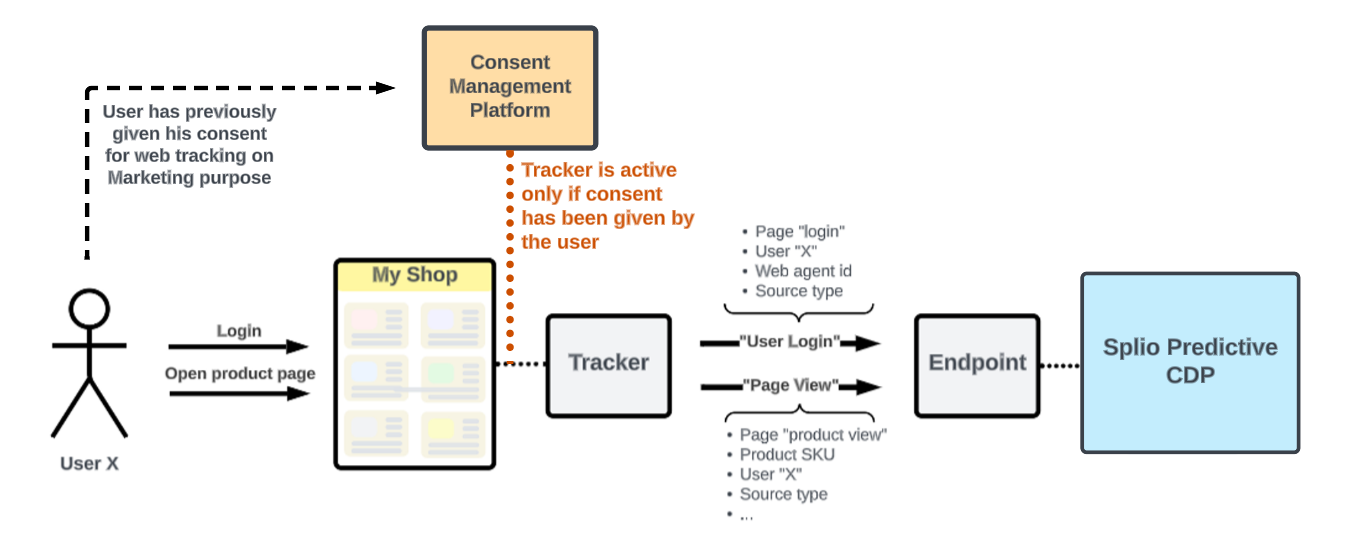
CMP / Tracker / Endpoint in web tracking event gathering
The Splio platform includes a dedicated public server for collecting the web tracking events, which currently supports the Snowplow opensource web tracker and will be open to more formats later.
To integrate web tracking in Splio, you basically just have to integrate one of the supported standard tracker (frontend or backend) in your standard tag manager, and configure it to :
- Use one or more of the supported event types
- Query the Splio Web Tracker endpoint
As with any web tracking solution, your website must conform to GDPR. Tracked events must be sent only for granted consent from the users. It is recommended to integrate a Tag Manager and a Consent Manager Platform to gather your end users' consents, and to enable tracker only when it is possible.
For more details on our recommendation on consent management and on tracker cookie policy, you can check this dedicated chapter (link to cookie management).
Supported event types
At this moment, the supported event types are :
- Page View, Product View or Thank You Page View, which can include these optional contextual informations:
- A product identification (Allowing for “product view” identification by the Splio Predictive engine)
- A logged in user identifier (Allowing for reconciliation of anonymous and authenticated traffic)
- A flag that indicates if an order has been completed (Thank you page visited)
- Add To Cart which can include this optional contextual information :
- A logged in user identifier (Allowing for reconciliation of anonymous and authenticated purchase, and detection of abandoned cart)
- Remove From Cart which can include the optional contextual information:
- A logged in user identifier (Allowing for reconciliation of anonymous and authenticated purchase, and detection of abandoned cart)
Note: anonymous navigation reconciliation is done over the last 30 days by default. This time window is configurable within the CDP settings.
These events work together to enable advanced marketing automation features like abandoned cart detection. The CDP analyzes the sequence of Add To Cart, Remove From Cart, and Thank You Page View events to identify abandoned carts and trigger appropriate marketing campaigns.
Updated 3 months ago